
Work order management is essential for any facilities operation. It ensures that service requests are captured, assigned, completed, and recorded, while giving teams a reliable history of each location, asset, provider, decision, and result across the full service lifecycle.
However, many organizations still coordinate maintenance through email, spreadsheets, phone calls, and disconnected portals that slow response times and hide important details. Teams waste hours chasing provider updates, and leaders lack one workflow to see which requests are open, in progress, complete, or waiting on approval. The result is more manual work, inconsistent service, avoidable cost, and limited visibility across every location and provider.
An optimized work order program is key to protecting uptime, controlling spend, and creating better experiences for requesters and clients. The best systems connect every step, allowing you to store relevant details in one place, automate repetitive work, and improve accountability.
In this guide, you will learn how connected work order management can save time and resources while improving service delivery. We will cover how work orders function, what to look for in a modern operating platform, and how myWork can help teams scale with control.
How work order management works
A work order is a record that defines and tracks service between a requester, a facility team, and a provider. It captures the location, asset, scope, priority, assignment, dates, costs, and evidence needed to move the request from intake through completion and create an operational record that teams can use for approvals, client updates, reporting, asset history, and future planning.
Work orders are used by retailers, restaurants, offices, manufacturers, property managers, and service networks coordinating work across many sites. They support reactive repairs, preventive maintenance, inspections, projects, recurring services, and any task that requires clear ownership and verifiable completion across every location and service partner.
Most programs require consistent details before work begins, including the request source, site, asset, service category, required response, provider, budget, and completion requirements.
What information needs to be on a work order?
A complete work order should include the requester and location, a unique work order number, priority and dates, scope and service details, cost and approval information, and completion requirements.

Depending on how your organization operates, you may require different work order rules. For example, priority, response targets, approval steps, provider requirements, and completion evidence may vary by site, service category, client, or asset. A connected platform should apply the right workflow while preserving a consistent record for every stakeholder.
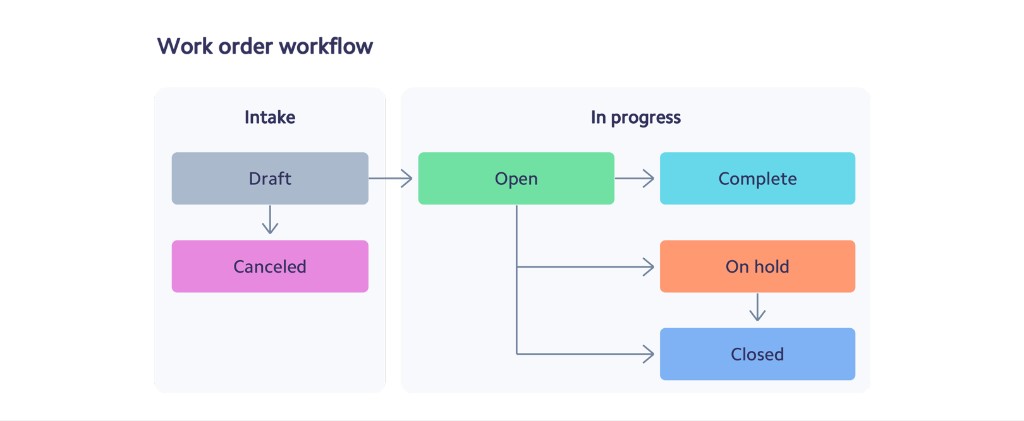
Once a work order is created, it moves through a series of states from draft and open to in progress, on hold, complete, or closed. Each status should show what happened, who acted, when the work changed, and what remains before the request can be approved and reported.
Work order workflow
What are the benefits of connected work order management?
Frictionless service experiences are important for every multi-site operation, especially when requests affect safety, uptime, or the customer experience. Requesters expect fast responses, clear updates, and confidence that the right provider is on the way. Connected work orders give them that visibility while helping operations teams simplify coordination, enforce standards, and reduce costs.
- A better requester and client experience: Traditional requests can disappear into email threads or separate portals, leaving requesters without updates or clear ownership. A connected workflow lets users submit complete information, receive status changes, review evidence, and confirm resolution. Facility teams can define priorities, response targets, communication rules, and approval steps that fit the operation while preserving one shared experience across every location.
- The ability to manage large or complex programs: Multi-site work can involve many locations, assets, trades, providers, visits, parts, and approval rules. One missed handoff can create downtime or avoidable spend. Standard work orders protect the operation by organizing scope, assignment, not-to-exceed limits, materials, status, and completion requirements. Teams can give providers flexibility in the field without losing control of cost, evidence, or service expectations.
- Streamlined approvals and internal processes: Finance, operations, and client teams often need to review estimates, change orders, invoices, or completed work before the request can close. A work order provides the shared record for each decision, helping teams verify service, control spend, answer questions, and preserve a history that every stakeholder can reference later.
- Lower operating costs: Automation reduces manual follow-up, duplicate entry, invoice disputes, unnecessary dispatch, and time spent rebuilding service history. Teams can focus less on administration and more on improving performance.
What to look for in a work order management system
Organizations often underestimate how complex work order management can become. A request may need to be triaged, routed by trade and location, approved against a budget, assigned to a qualified provider, tracked against a service target, documented in the field, reviewed, and connected to an invoice. Without the right tools, each handoff can introduce delay, risk, or inconsistent service.
Finding the right platform can remove repetitive coordination and simplify daily operations. Requests, messages, estimates, site notes, asset history, photos, approvals, and costs can live together in one place, creating a shared source of truth for operations, finance, clients, and providers. These advantages compound as the number of sites, work orders, and service partners continues to grow.
While basic tools let teams open tickets and record status, the best platforms coordinate the full work order lifecycle. They support mobile execution, enforce requirements, connect financial steps, preserve asset history, and integrate into existing systems without forcing teams to manage separate records.
Here are four things you should look for in a work order management system:
1. Ease of use
Choose a system that makes it easy to create, update, assign, and review work orders. Teams should be able to configure request forms, categories, priorities, locations, assets, providers, approval rules, service targets, budgets, and completion requirements without rebuilding the process. The platform should preserve templates, defaults, and role-based views so users are not starting from scratch each time and can focus on the decisions that need attention. Simple navigation and consistent terms help every participant adopt the workflow quickly.
Different users need different ways to engage. Requesters may use a portal or mobile form, coordinators may work from a command center, providers may update work in the field, and clients may need a read-only view. The system should send the right alerts at the right time, show each person only what is relevant, and keep every role simple enough to adopt without constant training.
2. Support for mobile teams and service providers
Field work depends on clear instructions, reliable communication, and evidence captured at the source. Look for mobile tools that let technicians accept assignments, navigate to a site, review history, record labor and materials, upload photos, collect signatures, note exceptions, and complete required checklists. Provider managers should also confirm qualifications, coverage, availability, and performance before work is assigned. These capabilities reduce phone calls and prevent important details from being lost between the office and the field.
However, field updates alone are not enough. A strong platform should connect mobile activity to the same work order used by requesters, coordinators, clients, finance, and providers. When status, scope, cost, or evidence changes, the record should update immediately so every stakeholder sees the same version of the work. Assignments, messages, estimates, photos, and completion details should remain attached to the request instead of being scattered across separate systems.
3. Streamlined service delivery
Operations teams lose time when they manually track open requests, chase providers, and send one-off reminders. Look for a system that automates assignment rules, acknowledgments, escalations, arrival alerts, due-date reminders, approval routing, and closeout reviews. Teams should also be able to prioritize work by risk, service target, client need, asset impact, or business hours, while coordinators retain the ability to intervene when the situation requires human judgment.
In addition to handling overdue work, the platform should help manage exceptions. Failed dispatches, rejected estimates, missing documents, repeat visits, and incomplete closeouts should trigger the right next step. Configurable rules can reassign work, request more information, escalate risk, or route approvals without losing the original context. Teams move work forward faster while preserving an audit trail of every action, decision, status change, and supporting document.
4. Reports and auditability
The best platforms generate clear reports and dashboards for daily operations and executive review. Teams should see request volume, aging, response time, completion time, provider performance, spend, asset history, repeat work, approval status, and client service results. Users should filter by site, region, trade, provider, client, asset, priority, or status and export data for finance and analysis. The record should also preserve who changed each field, when the change occurred, and what evidence supported the final approval or invoice decision. That detail makes audits, client reviews, and performance conversations faster and more reliable.
Your work order platform should also integrate with the systems that already run the business, including accounting, procurement, asset, property, and client applications. Better still, look for flexible data exchange so information can move without duplicate entry.
How myWork can help
myWork Enterprise is a connected work order platform built to coordinate service across sites, teams, and providers. Create and route requests, manage field activity, enforce approvals and completion requirements, and give every stakeholder a consistent view of the work.

myWork connects request intake, service coordination, mobile execution, approvals, and reporting in one operating platform, so teams can manage the full work order lifecycle with consistent data, clear ownership, and client visibility from day one.
- Easy to get started: Configure sites, users, trades, providers, forms, and workflows around the way your operation already works. Launch in phases, import core data, and expand without rebuilding the foundation or forcing every team into the same process.
- Work moves faster: Automate routing, notifications, escalations, approvals, and closeout requirements while giving coordinators a live view of every request and exception. Standard rules keep routine work moving, while flexible controls let teams respond to urgent or unusual service needs.
- Built for the field: Give technicians and providers mobile access to accept work, document visits, capture labor and materials, upload photos, and complete checklists.
- Scales with you: Support one team or a national service network with permissions, client visibility, integrations, reporting, and structured data. The operating record stays consistent as locations, providers, users, and work order volume grow.
For more information about connected work order management, explore myWork resources or speak with our team about your operating model and next step.
You can also use these related resources to plan your next step: